Pickleball Tournament Software
Run traditional pickleball tournaments with divisions, round robin pool play, bracket playoffs, phone-based score entry, and live standings, all from one shared event link. Publish the draw once and keep pools, brackets, and final placement where staff and players already are.
- Guest-friendly event link
- Director phones courtside
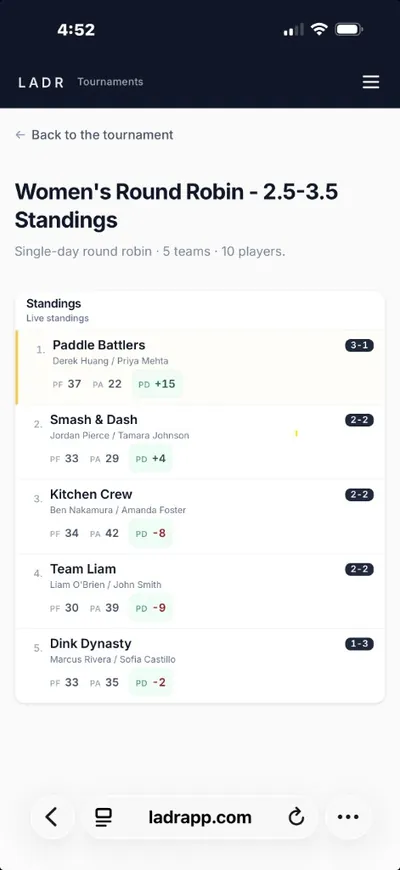
- Live event standings
When Saturday is mostly pool math, treat pools as first-class with round robin pool workflows on LADR. When the afternoon is playoff math, hand pool seeds straight into bracket software for the playoff round. When you also run a months-long club night outside this event, keep the recurring league home as the bookmark players already trust.
What LADR supports
One product, one event link, the formats clubs actually run. No add-ons, no separate apps for pool day and playoff day.
- Traditional tournaments: pool play into brackets, finals, podium.
- Divisions: skill, age, gender, or any custom split, each with its own pool and bracket.
- Round robin pool play: balanced rotations and live pool tables.
- Bracket playoffs: seed from pool finish into bracket rounds without swapping apps.
- Pod play: group the field into pods for the night or round.
- Ladder leagues: weekly placement and movement.
- Social leagues: low-stakes club nights where vibe matters.
- Phone-based score entry: volunteers tap in results from the floor.
- Live standings: pool tables, bracket draws, and finals on every phone.
- One shared event link: the room agrees on one URL all day.
What event directors care about
Tournament day fails in the gaps: a guest who cannot find the draw, a scorekeeper stuck in the office, a finals table nobody trusts. LADR targets those gaps first.
- Single event hub: pools, pods, and finals read from the same URL so nobody asks which PDF is current.
- Guest legibility: first-timers follow the event in the browser without installing your club’s stack of apps.
- Crew-friendly scoring: multiple trusted people can tap in results without sharing one login taped to a monitor.
- Room-scale clarity: what is on deck for court four matters as much as the trophy match, both belong in the live view.
Free to start · no credit card
Set up your tournament freeTournament shapes LADR fits
These are event-scale patterns: they can include pools, but they are not the same problem as “my HOA league varies who shows up each week.”
Club championships
Members plus invited guests, often with pod play before semis, everyone needs the same authoritative scoreboard.
Charity scrambles and fundraisers
High churn, lots of questions, little patience for software training, browser links beat app installs at registration tables.
Junior or adult ladder shootouts
Short brackets with tight turnaround between rounds; directors need phones to work while they are also reffing.
Multi-stage club opens
Morning pools, afternoon bracket, players should not relearn navigation when the stage name changes.
How event day stays linear
Publish → play → score → show placement, repeat until trophies. The software should not add a fifth mystery step.
- 1
Publish the event shell
Courts, stages, and naming land in one link, the desk prints QR codes if they want, but the browser stays canonical.
- 2
Onboard players fast
Share join flows for members and simple guest access for people who will never log in again after Sunday.
- 3
Run pools and brackets in place
Scorekeepers stay mobile; standings update in the same hub as you advance rounds.
- 4
Close with a defensible podium
Final placement reads from the same history players watched all day, less arguing, more handshakes.
FAQ: pickleball tournament software
- What does tournament software need to do that league software does not?
- Tournament day optimizes for strangers, tight clocks, and a disposable event object: you publish once, run hard, then archive, league software optimizes for week twelve remembering week three.
- Can LADR run a pickleball tournament with round robin and brackets?
- Yes. Run divisions, play round robin pools to seed, then advance into bracket playoff rounds, same event link end-to-end. Pool standings settle the seeds, brackets carry the history forward, and final placements read from the same hub players watched all day.
- Can I create divisions in a pickleball tournament?
- Yes. Split the field by skill (3.0, 3.5, 4.0, 4.5+), age, gender, or any custom shape your draw needs. Each division carries its own pool standings, bracket, and final placements while sharing one event link with the rest of the tournament.
- Do guests need accounts?
- Guests should be able to follow the event in the browser from the link you text or print, no app store gate on arrival.
- Do players need to download an app?
- No. Players open the event link in any current mobile browser on iPhone or Android, same link for matchups, score entry, pool tables, bracket draws, and standings. No App Store, no Play Store, no install prompts at the registration table.
- Can scorekeepers work from phones between games?
- That is the default posture: short taps between matches so directors stay courtside instead of behind a desk.
- Is LADR good for small club pickleball tournaments?
- Yes. Small club tournaments are LADR's center of gravity, monthly draws, charity scrambles, member-and-guest opens, junior shootouts. You set up in minutes, run pool play and brackets from a phone, and skip the printed bracket sheets and group-text score updates entirely.
- Is there free pickleball tournament software?
- LADR is free to get started, no credit card required. Social leagues and pod play are always free. DUPR submission and online payment collection are coming soon.
Ship your next draw with less desk drama
No credit card to get started. Publish a small club event, hand guests one link, and see if live standings shrink the line at the tournament table.