Pickleball Round Robin Software
When the night is a pool block, mixers, qualifier pods, or everyone-plays blocks, keep rotations, pending games, and tiebreakers in one live table so courts turn over without a circulating paper grid.
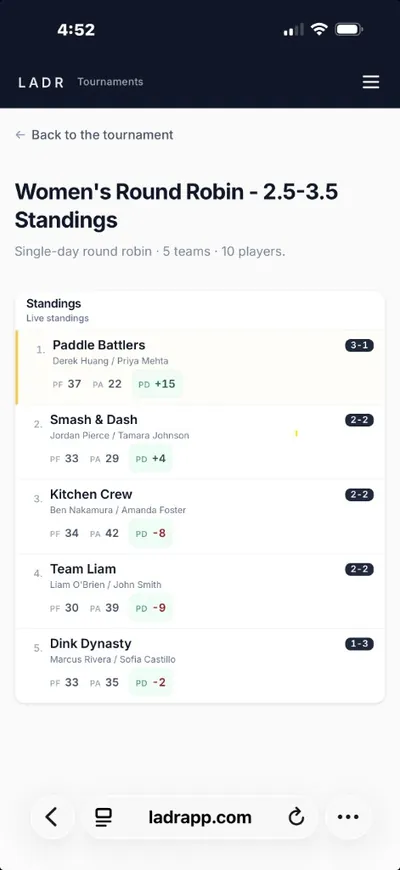
- Pool tables, not photos
- Rotation everyone sees
- Tiebreakers in view
Pools inside a bracket day ride the same score flow as the rest of the event, see full club tournament day on LADR for the whole-room hub. When pool finish needs to feed the playoff round, hand seeds straight into pickleball bracket software for the advancement and finals rounds. If the pool block repeats as part of a season calendar, hang the longer story on recurring league software. Need to auto-generate the pool schedule before you run it? Our pickleball round robin generator handles balanced rotation from player count and court count. Scoring happens in the browser on the same link players already have, see the phone-first pickleball tournament app experience for how pool standings read on mobile between games.
Why pool directors stop mailing grids
Round robin nights die by a thousand clarifications: who is idle, who is tied, who still needs a game. LADR keeps the grid authoritative.
- Rotation honesty: pending games and completed games stay visible so nobody “accidentally” skips a pairing.
- Tie math out loud: differential and head-to-head context sit with the table, not in a commissioner's head.
- Court turnover cues: who should grab which court next is obvious from the live assignments, not from shouting across four nets.
- One pool artifact: avoid five screenshots of the same whiteboard with different corners folded in.
Free to start · no credit card
Create your round robin freePool blocks we see on gym floors
These are pool-first problems: everyone needs their games, and the room needs to agree on the table. They are not the same as ladder challenges or season archives.
Single-pool mixers
One group, one table, one night, rotation and standings stay married so the mixer ends on time.
Qualifier pods
Advancement depends on pool order, keep each pod’s math visible before you seed the next stage.
Multi-pool gym splits
North gym vs south gym pools still need a commissioner view that does not require two clipboards.
League-night pool segments
Sometimes Tuesday is a pool sprint inside a bigger league brand, model the sprint here, keep the season story elsewhere.
How a pool block runs
Pool night is publish grid → play games → enter results → let the table reorder, repeat until everyone is square.
- 1
Publish the pool grid
Lock pairings and court assignments so the room agrees on who owes what.
- 2
Run games in parallel
Courts move independently; the software should tolerate out-of-order finishes without breaking math.
- 3
Enter results as courts clear
Tap in games from the floor, pool math updates while you are still holding a paddle bag, not a laptop.
- 4
Close the pool with a visible table
Advancement or placement reads from the same standings link players watched all night.
FAQ: pickleball round robin software
- What is pickleball round robin software?
- Software centered on pool math: who still owes games, how tiebreakers shake out, and which court is up next, distinct from running an entire season calendar or a full bracket weekend.
- Is this the same as tournament software?
- Tournament day can include pools plus brackets, finals, and trophies. This page is for the pool-shaped slice, when the hard part is fair rotation inside a block, not the whole event lifecycle. When pool finish needs to feed a playoff round, see pickleball bracket software.
- Can players follow pool tables live?
- Yes. They refresh the pool standings link as you enter games, no install, no asking which version of the photo is current.
- We only run pools once a month inside a league, where does that live?
- Model the pool block here for clarity on rotation and differential; anchor the longer calendar in league software if you need season-long context beyond the pool.
- Can I use LADR for a pickleball mixer or social event round robin?
- Yes. Mixers are a common pool format: a single group plays a set of balanced pairings in one block. Enter results as games finish and let the pool table settle rotation and tiebreakers, no separate sheet to circulate.
Run the pool block like a product, not a poster
Free for social play, no credit card needed. Host a real mixer or pod, enter games from the floor, and see if the room stops re-asking who is still owed a game.