Pickleball Bracket Software
Pickleball bracket software for the playoff round after pool play. Seed teams from round-robin standings, advance through bracket rounds, enter scores from phones, and publish final placements, all on the same event link players watched all morning.
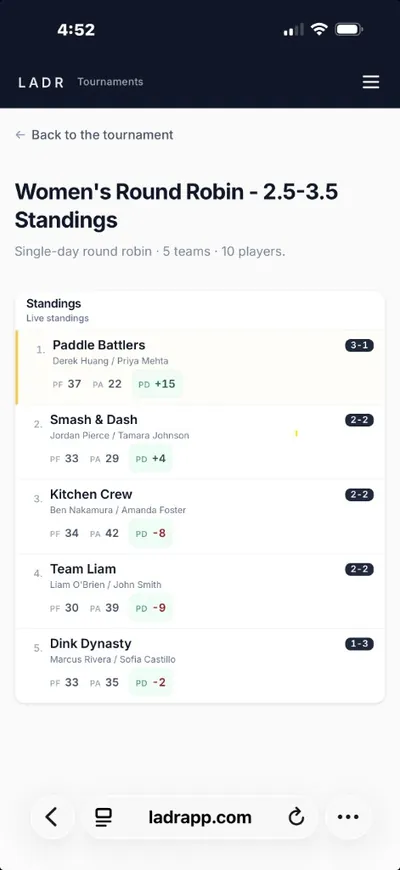
- Pool seeds → bracket rounds
- Phone score entry
- One event link
Brackets sit on top of pool play, run pools first with round robin pool workflows, then hand seeds straight into the playoff round here. The whole event, pools, brackets, finals, lives inside one pickleball tournament software hub, so players keep refreshing one link in the same phone-first tournament app they used at registration.
What pickleball bracket software actually has to do
The playoff round is where event-day software fails most often: seeds get re-typed, brackets diverge from pool standings, and the printed sheet on the wall stops matching reality. LADR keeps the bracket honest.
- Seeds from pool finish: pool record, point differential, and tiebreakers feed the bracket draw automatically; no re-typing into a second tool.
- One event link end-to-end: players follow pools, then bracket rounds, then finals on the same URL; no mid-day “check this other app” messages.
- Mobile-first advancement: scorekeepers tap in results from the floor; the bracket reflects winners before anyone gets back to the desk.
- Defensible final placements: podium reads from the same history the room watched all day, not a hand-edited sheet that appeared at trophy time.
Free to start · no credit card
Build your first bracket freeBracket shapes LADR fits
Playoff math after pool play. These are bracket-first patterns, not season-long ladder movement.
Round robin into single-elimination
Morning pools settle seeds; afternoon bracket plays straight to a champion. The default club tournament shape.
Pool play into double-elimination
Lose once, drop into the consolation side; second loss ends the day. Same seed flow, more matches per division.
Multi-division bracket day
3.0, 3.5, 4.0, and 4.5+ each carry their own bracket; the desk sees every division in one hub instead of four printouts.
Direct-seed brackets
When the draw is published before the day starts, seed the bracket manually and skip pool play, the event link still keeps everyone aligned.
How a round-robin-into-bracket day runs
The classic shape: divisions → pool play → seed → bracket → placements. The software should make each step the same link, not a new tool.
- 1
Create divisions
Split the field by skill, age, or any custom shape; each division carries its own pool block and its own bracket draw.
- 2
Run round robin pool play
Balanced rotations inside each division; pool standings update as scores come in, with tiebreakers visible.
- 3
Seed into the bracket
Pool finish flows into bracket positions automatically, or seed manually if the draw was published in advance.
- 4
Advance through bracket rounds
Tap in match results from the floor; winners advance round by round and the bracket draw updates on every phone in the room.
- 5
Publish final placements
Podium and full final placements read from the same standings link players watched all day, less arguing, more handshakes.
FAQ: pickleball bracket software
- What is pickleball bracket software?
- Software for the playoff round of a tournament: take the field that already played round-robin pools, seed it into a single- or double-elimination bracket, advance winners round by round, and publish final placements, without leaving the event link players have been refreshing all day.
- Can I run round robin pool play first and then advance into a bracket?
- Yes. Run divisions, play round-robin pool blocks to settle seeds, then drop those seeds into bracket rounds on the same event link. Pool standings carry forward; players do not switch apps when the playoff round starts.
- How are players or teams seeded into the bracket?
- Seeds come from pool finish, pool record first, then point differential, then head-to-head. You can also seed manually if your event already has a published draw. Either way the bracket reads from the same standings hub the room has been watching.
- Can I run multiple divisions, each with their own bracket?
- Yes. Every division (3.0, 3.5, 4.0, 4.5+, age groups, gender splits, or any custom shape) carries its own pool standings and its own bracket draw. Players see only their division; the desk sees all of them in one hub.
- Do bracket draws update on phones during play?
- Yes. As scorekeepers tap in match results from the floor, the bracket advances winners and loser-bracket teams in real time. Spectators and on-deck players refresh the same link to see who is up next on which court.
- Do players need to download a bracket app?
- No. The pickleball tournament bracket app experience runs in any current mobile browser on iPhone or Android. Players follow brackets, pool tables, and standings from one link, no App Store, no Play Store, no install at the registration table.
- Is LADR good for small club playoff brackets?
- Yes. Small club tournaments are LADR's center of gravity, monthly draws, member-and-guest opens, junior shootouts. The bracket layer is built for the room where the director is also reffing, the desk is also entering scores, and the printed bracket sheet is the thing nobody trusts by round two.
- Is the bracket software free?
- LADR is free to get started, no credit card required. Social leagues and pod play are always free. DUPR submission and online payment collection are coming soon.
Run pool play into a bracket without the printout drama
No credit card to get started. Set up your divisions, run pool play, advance straight into bracket rounds, and let the room agree on one link instead of four printouts.