Pickleball Ladder App
A phone-first ladder players actually check between sessions. See this week's placement, last week's movement, and who is up next, without chasing a screenshot in the group chat or waiting for the commissioner to redraw the board.
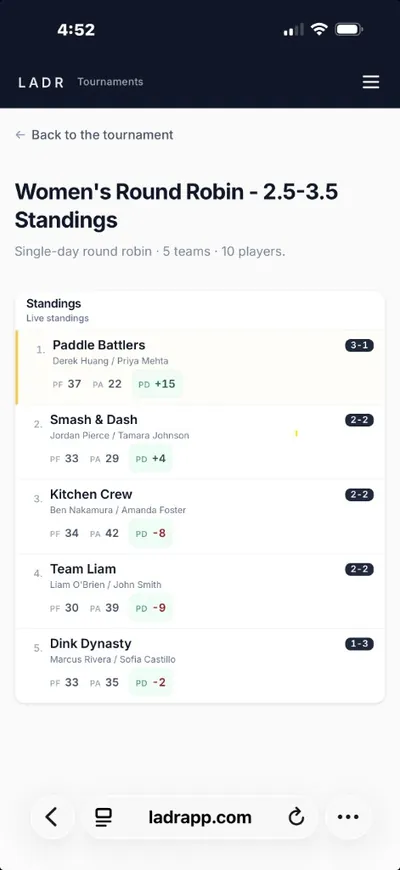
- Browser-based, no install
- Weekly placement clarity
- Challenges you can trace
Running the ladder itself, challenge rules, score entry, placement math, lives on the ladder software page. If your club also runs a season calendar with the same roster, read how weekly leagues carry standings forward week over week. New to the format? The ladder tournament app organizer guide walks through weekly setup, pod assignments, and how to avoid the spreadsheet trap.
What players want from a ladder app
Ladder players don't want dashboards, they want a clean answer to three questions: where am I, what did last week do, and who do I play next?
- Current placement, up top: open the link and see where you sit this week, not a buried feed of unrelated notifications.
- Readable movement: last week's games are attached to the placement change, so rungs move for reasons players can point at.
- Challenges in plain view: who challenged whom, when it locks, and what court it lands on, visible to everyone on the same link.
- Tap-in scoring: a captain or scorekeeper enters the result courtside; the ladder updates without a desk detour.
Free to start · no credit card
Give your ladder a live linkLadder styles the app handles
Ladders look different from club to club. The shared part is cadence and placement, LADR keeps both legible.
Weekly up-and-down ladders
Winners climb a fixed number of courts; losers drift down. The app shows the move and the game that caused it.
Challenge-based ladders
Players issue challenges; the app shows pending, locked, and resolved so nobody argues about who was next.
Multi-tier ladders
Separate A/B/C ladders on the same night, each tier has its own placement, all reachable from one roster.
Short-season ladder shootouts
Four to six weeks of movement ending in a final placement, the app closes the story with a snapshot.
How weekly ladder progression works
Ladder night is a loop: see placement → play games → log results → watch movement. LADR makes each step a single link away.
- 1
Open the ladder link
Players bookmark one URL; placement, challenges, and last week's results all live there, no onboarding required.
- 2
Play the week's games
Challenge rules and court assignments are visible on the same screen, so warm-ups don't stall on clarifications.
- 3
Enter results from the court
Scorekeepers tap in scores as courts clear; the ladder reorders in place, not in a follow-up announcement.
- 4
Carry placement forward
Next week starts from where this week ended, no manual rewrite, no commissioner redrawing arrows on Sunday night.
FAQ: pickleball ladder app
- What is a pickleball ladder app?
- A phone-first view of a ladder's current placement plus the games and challenges that move it, so players stop asking the commissioner where they sit and what happens if they win Tuesday.
- How is the app different from ladder software for organizers?
- Same system, two angles. The app is what players open on their phone each week; the organizer workflows live alongside it so results, challenges, and placement stay one source of truth.
- Do players need to install anything?
- No. LADR runs in the browser, open the ladder link you publish and it just works. Players bookmark it like they would a schedule.
- Can we mix weekly ladder nights with a league season?
- Yes. Ladder nights, league weeks, and one-off tournaments can all live in the same LADR account, each keeps its own identity without forking into a second tool.
- Does the app show movement history, not just today's ladder?
- It's built for the "why did I drop two rungs?" question, placement reflects the games behind it so the story is readable, not mysterious.
Give your ladder a link players keep open
Free for club ladders, no credit card needed. Stand up a real ladder, publish the link, and see if players stop asking where they stand.